

How Prompt Libraries Work for Teams
A team prompt library is a governed, shared collection of tested prompt templates, each with a named owner, the model it was last tested on, and a change log, so output stays consistent no matter who runs the prompt. Big Mike is not a prompt library tool; we are a model-backed sports picks service, free for 7 days and then $25 per month, with every pick since June 23, 2026 graded in public. We recommend our service only for the one recurring job it actually replaces: handicapping a slate across NFL, CFB, NBA, MLB, and WNBA. For every other recurring AI task, this guide on how prompt libraries work for teams shows you how to build the library yourself.
Key takeaways
- Three fields separate a team library from personal notes: a named owner, the model and date each prompt was last tested on, and a version history.
- Prompts should move through four states: draft, tested, approved, deprecated. A model update sends every approved prompt back to tested until its examples are rerun.
- Hosting depends on team size: under ten people, Notion or one Git repo is enough; compliance-heavy teams need diffs and access logs, which usually means Git or a dedicated prompt manager.
- Grading in public keeps a library honest: Big Mike grades every pick with live odds and never deletes a loss; a prompt library needs the same rule for every run.
- Big Mike costs $25 per month after a 7-day free trial, sends picks by text at 11am and 5pm ET, covers five sports, and does not cover NHL.

What is a shared prompt library, and how is it different from everyone saving their own prompts?
A shared prompt library is a governed collection of prompt templates that a team has tested and assigned owners to. Personal prompts live in one person's notes app and vanish when they leave. A team library adds three things personal notes lack: a review step, a version history, and metadata showing which model each prompt was last validated on.
The difference is not where the text sits. A Google Doc full of prompts that nobody reviews is still a pile of personal notes, just a shared one. The library becomes a team asset the moment a second person can run a prompt, get the same quality of output, and know whom to ask when it breaks.
The NIST AI Risk Management Framework treats documentation and traceability of AI system components as a core governance function. A prompt library is the cheapest place to start that paperwork, because the artifact is plain text and the reviewer is a teammate, not a committee.
Why do teams need a prompt library instead of letting everyone freelance?
Teams build prompt libraries for four reasons: consistent output across people, faster onboarding, fewer hours lost rebuilding the same prompt, and a way to spread what the best prompter on the team already knows. The cost of not having one is invisible because each person's duplicated effort is small; the total across a team of twenty is not.
The consistency argument matters most when the same question gets asked every day. We publish writeups across five sports twice daily, and the value of a daily product is that a reader knows what to expect at 11am and again at 5pm ET. A support team answering the same ticket type 200 times a week is in the same situation: the hundredth answer should be as good as the first.
Adoption is already broad enough that this is a coordination problem, not an experiment. McKinsey's State of AI research reports that a majority of surveyed organizations now use generative AI in at least one business function. If most of your team is already prompting, the only question is whether they are doing it in a shared system or in private tabs.
How should a team organize and tag prompts so people can actually find them?
Organize prompts by the workflow they serve first and the role second, then tag each one with model, output format, and status. Use a flat naming convention like task-name-v3 so the version is visible in the filename. Put a README at the root that says how to add a prompt and who approves it.
Here is a folder tree that works for a team of five to fifty. The structure is deliberately shallow, because people stop looking after two clicks.
prompt-library/
  README.md                 how to add, who approves, how to retire
  support/
    ticket-triage-v3.md
    refund-reply-v2.md
  sales/
    outreach-first-touch-v4.md
    call-summary-v1.md
  engineering/
    pr-summary-v2.md
    test-case-generator-v1.md
  analysis/
    weekly-metrics-recap-v2.md
  _deprecated/
    outreach-first-touch-v3.md
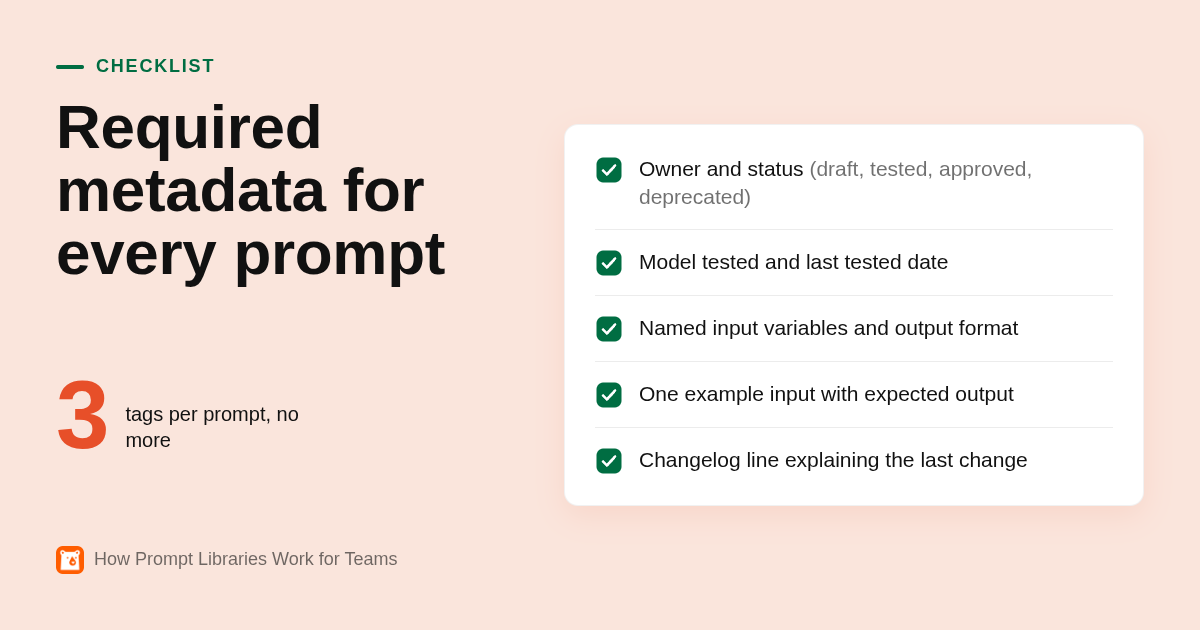
Every file carries the same metadata header. The schema we recommend has eight fields: owner, status, model_tested, last_tested, use_case, inputs, tags, and changelog. If a prompt is missing model_tested or last_tested, it is not approved, full stop.
Tagging rule: one tag for the output format (table, email, summary, json), one for the model family it was tested on, and one for the status. Three tags, no more. Teams that allow freeform tagging end up with forty tags and no search.
What should a good prompt template include so it works for multiple people and multiple models?
A prompt template has five parts: a context block stating who the model is and what it knows, the task in one sentence, named variables for the inputs that change each run, an explicit output format, and one example input with its expected output. Templates that skip the example are the ones that drift first when a new model ships.
Here is a sample entry using the schema above. Variables use single braces so anyone can spot what to replace.
owner: dana.r
status: approved
model_tested: gpt-4.1
last_tested: 2026-10-14
use_case: first reply to a refund request
inputs: {ticket_text}, {order_age_days}, {refund_policy_excerpt}
tags: email, gpt-4, approved
changelog: v2 added policy excerpt after v1 invented refund windows

You are a support agent for an online retailer. You only know what is in
{refund_policy_excerpt}. Write a reply to {ticket_text}. The order is
{order_age_days} days old. Output: three short paragraphs, no subject
line, no promises outside the policy excerpt.

Example input: [40-day-old order, policy allows 30 days]
Example output: [polite decline, offers store credit if policy permits]
The changelog line is the most useful field in the file. It tells the next person why v2 exists, which is the information that gets lost when someone just overwrites the old text.
For multi-model use, keep the context, task, and format shared, and store model-specific tweaks as a short variant note at the bottom rather than as a second file. Two full copies of the same prompt will drift apart within a month.
Who owns the prompt library, and how are prompts reviewed, versioned, and retired?
One named owner per prompt and one librarian for the whole collection. Prompts move through four states: draft, tested, approved, deprecated. Edits create a new version with a changelog line; nothing is overwritten. When a model version changes, every approved prompt drops back to tested until someone reruns its examples. Deprecated prompts are archived with their history, never deleted.
The lifecycle in practice looks like this. A draft is anything one person wrote and found useful. It becomes tested once the owner has run it against a fixed input set on the target model and recorded the results. It becomes approved when a second person, the librarian or a function champion, has reviewed the test results and the metadata header.
Prompts that touch customers or legal language should require two reviewers. Internal prompts, like a meeting summarizer, need one. Writing this rule into the README prevents the library from becoming either a free-for-all or a bottleneck.
Retirement is where most libraries get sloppy. The rule we apply to picks is the one to borrow: every pick since June 23, 2026 is graded with live odds, losses are published, and nothing is deleted or cherry-picked, as you can check on our full public picks record. A deprecated prompt should keep its test history and changelog in the archive folder, so when someone proposes the same idea again next quarter, the reason it was retired is still there.
Can you test a prompt before it enters the library, and how do you measure whether it is working?
Yes. Before a prompt is approved, run it against a fixed set of ten to twenty real inputs on the target model and score the outputs with a simple rubric. After approval, keep grading: log every run that needed a rewrite, keep the misses visible, and measure rework rate and time per task against the pre-library baseline.
The test set is the part teams skip. Ten real tickets, ten real pull requests, ten real call transcripts, saved next to the prompt. Without them, re-testing after a model update means someone eyeballing a single output and saying it looks fine. With them, re-testing is a twenty-minute job with a before-and-after score.
Model change is not hypothetical. The Stanford HAI AI Index documents year-over-year shifts in model capability across benchmarks, which is a polite way of saying a prompt validated on last year's model is not validated on this year's.
Two measures are enough to start. Rework rate: of the outputs produced from this prompt, how many did a human rewrite more than lightly? Time per task: how long did the job take before the library and how long does it take now? If neither number moves after a month, the prompt is not earning its slot.
Grade the process, not just the result. Our NFL writeup after the Bears beat Philadelphia made the point that the useful fact was not the win but that the market spent all day getting more confident in the wrong team. A prompt that produced a good output by accident, on an input it was never designed for, is a miss you should log even though the result looked fine.
Which tools work best for hosting a team prompt library?
For a team under ten people, Notion or a single Git repository is enough and both have free tiers. Teams with engineers and compliance needs should use Git, because pull requests give you a review gate and a diff for every change. Dedicated prompt managers only pay off when prompts ship inside a product rather than a chat window.
| Option | Best for | Pricing or format | Standout limit |
|---|---|---|---|
| Notion | Non-technical teams under ten people | Free plan available, paid plans per seat; confirm current pricing on notion.com | Page history exists but there is no real review gate or diff view |
| Confluence | Teams already on Jira and Atlassian | Free plan for small teams, paid per user; confirm on atlassian.com | Search degrades fast as pages sprawl |
| Git repo (GitHub or GitLab) | Engineering-heavy teams and anyone needing an audit trail | Free for private repositories on both platforms; confirm on vendor sites | Non-engineers rarely open a pull request |
| Text expanders (TextExpander, Raycast snippets) | Getting prompts into the cursor in any app | Per-user subscription for TextExpander; Raycast has a free tier; confirm on vendor sites | They distribute whatever is saved with no testing or review layer |
| Dedicated prompt managers (PromptLayer, Langfuse) | Product teams shipping prompts inside software | Usage or seat based; Langfuse offers an open-source self-hosted option; confirm on vendor sites | Overkill for a team using ChatGPT through the web interface |
The honest pattern is a pairing. Git or Notion is the system of record with the review process; a text expander or a pinned chat command is the delivery layer. The record lives in one place and the shortcut points at it.
For regulated teams, the deciding question is whether you can answer who changed which prompt, when, and who approved it. Git answers that by default. Notion answers it partially. A text expander alone does not answer it at all.
How do teams get prompts into real workflows rather than a dead document?
Seed the library with ten to fifteen prompts for the three tasks people run most, then put a trigger at the point of work: a snippet shortcut or an IDE command. Name one champion per function. Review usage monthly, prune what nobody ran, and pair the library with prompting training so people can fix a prompt instead of pasting it.
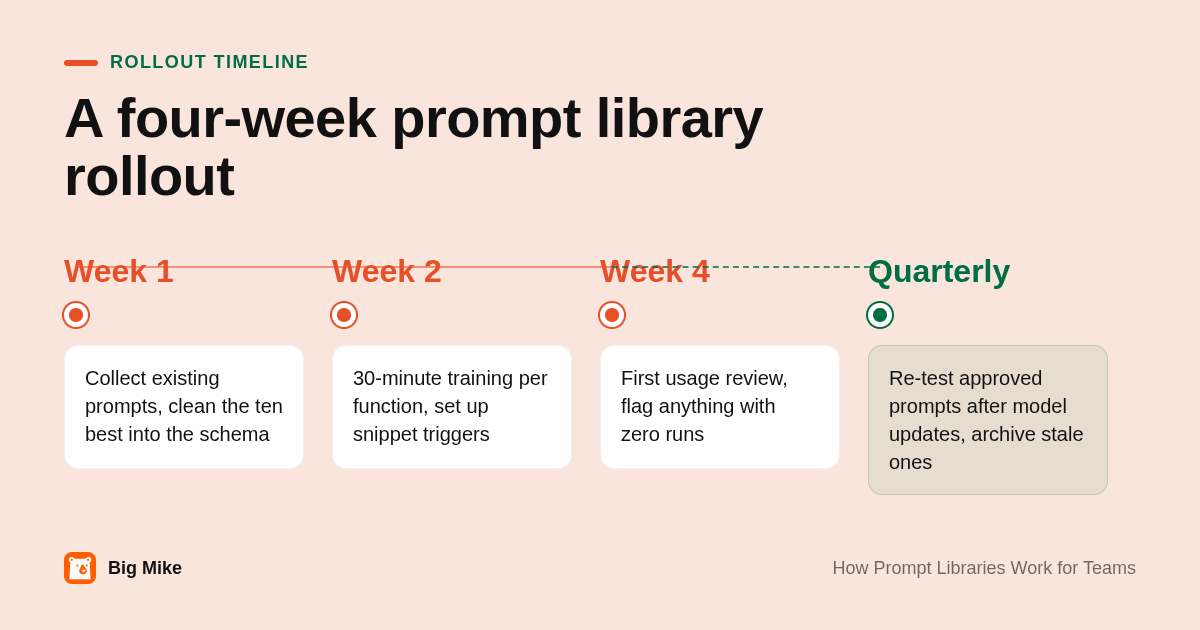
A rollout that works fits in a month. Week one: the librarian interviews five people, collects the prompts they already use, and cleans up the ten best into the schema. Week two: a thirty-minute session per function showing where the library lives and how to propose a change. Week four: the first usage review, where anything with zero runs gets a note asking why.
The skeptic's objection is correct and worth building around. A library of copy-paste prompts can turn into a crutch where nobody learns why a prompt works, so the first time an input falls outside the template, output quality collapses. The fix is to treat the library as teaching material: every approved prompt's changelog explains what was wrong with the previous version, and the training session walks through those changes rather than the prompts themselves.
Allow an empty result. Some days the honest answer is that no prompt in the library fits, and a person should write the thing by hand. We run our picks the same way; a Tuesday where nothing clears the number and the board is empty on purpose is a correct output, not a failure. A library that pressures people to force a template onto every task produces worse work than no library.
When do prompt libraries fail as an AI strategy?
Prompt libraries fail when they encode last year's model, when inputs are bad, or when people treat them as a substitute for judgment. It cannot supply data the model lacks, and it cannot grade its own output. For jobs where being wrong costs money, like betting, you need a tracked model with a public record, not a prompt.
The first failure is staleness. If nobody owns re-testing after a model update, the library silently becomes a collection of prompts tuned for a model nobody uses anymore. The four-state lifecycle above is the defense, and it only works if the librarian role is a real assignment with time attached.
The second failure is scope. A prompt can format, summarize, draft, and classify. It cannot know an injury report that dropped ten minutes ago or whether a line moved from -199 to -138 overnight. That is why we do not sell a library of handicapping prompts. We sell picks from a model that compares fair odds to the market price, delivered by text at 11am and 5pm ET, with every result graded in public; 716 picks had been graded as of October 20, 2026, and that count grows daily. We are not an odds screen or an arbitrage tool, and we do not cover NHL.
The decision rule: if a recurring task is judged by how it reads, a prompt library is the right tool. If it is judged by whether it was right, you need something with a scoreboard.
How did we compare the hosting options?
We compared the published plan pages for Notion, Confluence, GitHub, GitLab, TextExpander, Raycast, PromptLayer, and Langfuse, and checked each tool for three things: whether it keeps a version history, whether it offers a review or approval gate, and whether it records who changed what.
How do you get started with Big Mike?
If the recurring job on your team is handicapping tonight's slate, skip the prompt library for that one task. Big Mike sends model-backed picks by text at 11am and 5pm ET across NFL, CFB, NBA, MLB, and WNBA, with every pick graded in public since June 23, 2026.
Start your free 7-day trial at bigmike.app and check the graded record before you pay a cent.
What do people also ask?
What is a shared prompt library and how is it different from each person saving their own prompts?
A shared prompt library is a reviewed, versioned collection of prompt templates with a named owner and a record of which model each prompt was last tested on. Personal prompts have none of those three things, so they cannot be trusted by a second person or recovered when the author leaves.
How should a team organize and tag prompts so people can find them?
Group by workflow first and role second, keep the folder tree two levels deep, and name files task-name-v3 so the version is visible. Limit tags to three per prompt: output format, model family, and status. Put a README at the root explaining how to add, approve, and retire a prompt.
Who owns the prompt library and how are prompts versioned and retired?
Each prompt has one owner and the whole library has one librarian. Prompts move from draft to tested to approved to deprecated, every edit creates a new version with a changelog line, a model update drops approved prompts back to tested, and retired prompts are archived with their history rather than deleted.
Which tools work best for hosting a team prompt library?
Teams under ten people do fine with Notion or a single Git repository, both of which have free tiers. Teams needing an audit trail should use Git because pull requests provide review and diffs. Text expanders handle delivery but not review, and dedicated managers like PromptLayer or Langfuse are for prompts shipped inside software. Confirm current pricing on each vendor's site.
Is Big Mike a prompt library tool?
No. Big Mike is a model-backed sports picks service covering NFL, CFB, NBA, MLB, and WNBA, with picks sent by text at 11am and 5pm ET and every pick since June 23, 2026 graded in public. It is free for 7 days and then $25 per month. It is not an odds screen, an arbitrage tool, or a prompt manager, and it does not cover NHL.
Related Articles



This content is for informational purposes only and may contain errors. Please contact us to verify important details.